103 liens privés
MindAR is a web augmented reality library. Highlighted features include:
- ⭐ Support Image tracking and Face tracking. For Location or Fiducial-Markers Tracking, checkout AR.js
- ⭐ Written in pure javascript, end-to-end from the underlying computer vision engine to frontend
- ⭐ Utilize gpu (through webgl) and web worker for performance
- ⭐ Developer friendly. Easy to setup. With AFRAME extension, you can create an app with only 10 lines of codes

This page holds complete, step-by-step installation and set-up instructions for the AR Sandbox software, starting from a blank desktop PC with an Nvidia GeForce graphics processing unit (GPU). These instructions are based on the current version of the Linux Mint operating system. Due to increasing weirdness in recent versions of Mac OS X (starting with version 10.7), we can no longer recommend Mac computers and Mac OS X to drive AR Sandbox installations.
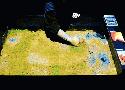
There’s something incredibly gratifying about swiping your hand across a surface, digging a trough with your fingers, and watching a flowing river come to life before your eyes. These interactive displays use sand as the base medium, allowing you to scoop, smash, and splatter structures that are then analyzed by a Microsoft Kinect and fed to a computer, which then projects a topographical map onto the surface. The result is you feeling like a giant, shaping the world beneath you
The goal of this collection is to provide a set of basic and instructive examples that introduce the various features in the Javascript-based Augmented Reality (AR) library, AR.js. Advanced three.js examples are also included.
Viewing the AR examples will require a device with a camera and one or both of the Hiro and Kanji marker patterns (either printed or displayed on a second device).
AR.js is a lightweight library for Augmented Reality on the Web, coming with features like Image Tracking, Location-based AR and Marker tracking.