103 liens privés
Libertix : installez facilement Linux à partir de Windows !
🎯 Libertix est une application pour Windows qui permet à tout utilisateur, même novice, d’installer simplement Linux sans clé USB et en seulement quelques clics.
- Installation en quelques clics : plus besoin de manipuler des partitions manuellement ou de créer une clé USB bootable.
- Compatibilité : fonctionne sur les ordinateurs sous Windows 10 et 11.
- Double Boot : permet de conserver Windows tout en ajoutant Linux, offrant ainsi le choix au démarrage.

DoudouLinux - L'ordi qu'ils préfèrent
« DoudouLinux révèle aux enfants le potentiel créatif, éducatif, culturel et divertissant qui sommeille en tout ordinateur. »
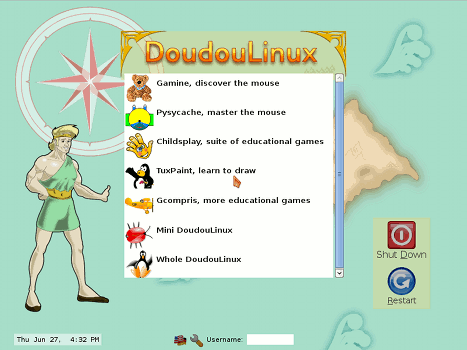
DoudouLinux est un système conçu pour les enfants afin de leur rendre l’utilisation de l’ordinateur la plus simple et la plus agréable possible (et pourquoi pas leurs parents aussi ! [1]), tout en se souciant de l’épanouissement des enfants. En plus de fournir des dizaines d’applications qui conviennent aux enfants de 2 ans à 12 ans, DoudouLinux cherche à leur présenter un environnement aussi facile à utiliser qu’une console de jeu. Ils peuvent ainsi facilement apprendre ou découvrir en s’amusant et… sans la surveillance permanente de Papa et Maman !
À l’heure où la fin du support de Windows 10 nous rappelle notre dépendance technologique et nous oblige à faire des choix, un collectif enseignant issu de la forge des communs numériques éducatifs invite les établissements scolaires et les collectivités qui les accompagnent à s’engager progressivement vers un Numérique qui soit davantage Inclusif, Responsable et Durable, en rejoignant la « démarche NIRD ».
Au carrefour du double objectif de transformation numérique et de transition écologique, la démarche NIRD repose sur trois piliers :
- Inclusion : accès équitable au numérique, réduction de la fracture numérique…
- Responsabilité : usage raisonné et réflexif de technologies souveraines et respectueuses des données personnelles…
- Durabilité : lutte contre l’obsolescence programmée par le choix de Linux pour l’équipement, maîtrise des coûts…
Nix is a tool that takes a unique approach to package management and system configuration. Learn how to make reproducible, declarative and reliable systems.
ntfy lets you send push notifications to your phone or desktop via scripts from any computer, using simple HTTP PUT or POST requests. I use it to notify myself when scripts fail, or long-running commands complete.
Password management should be simple and follow Unix philosophy. With pass, each password lives inside of a gpg encrypted file whose filename is the title of the website or resource that requires the password. These encrypted files may be organized into meaningful folder hierarchies, copied from computer to computer, and, in general, manipulated using standard command line file management utilities.
pass makes managing these individual password files extremely easy. All passwords live in ~/.password-store, and pass provides some nice commands for adding, editing, generating, and retrieving passwords. It is a very short and simple shell script. It's capable of temporarily putting passwords on your clipboard and tracking password changes using git.
You can edit the password store using ordinary unix shell commands alongside the pass command. There are no funky file formats or new paradigms to learn. There is bash completion so that you can simply hit tab to fill in names and commands, as well as completion for zsh and fish available in the completion folder. The very active community has produced many impressive clients and GUIs for other platforms as well as extensions for pass itself.
The Linux distribution for mobile devices and beyond…
Mission
postmarketOS develops free and open-source software to extend the life of consumer electronics. By empowering people to have full control of their devices, we promote a healthier and more sustainable society.
Sustainability
Oftentimes the usefulness of phones, tablets and other computers is artificially limited by lack of software updates. This is either caused by closed source software that cannot be updated by anyone but the original developers. Or by having highly specific code for few devices, which can only be maintained and updated by a large team of developers. With postmarketOS we do the opposite, we build an open source operating system with many shared components that can run on all devices. We want to keep our hardware useful until it physically breaks!
Full Control
We think computers should act in the interest of their users. For example, they should not participate in the privacy nightmare of targeted advertising, as it is directly built into the operating systems from Amazon, Apple, Google and Microsoft, as well as the apps and services recommended by them. postmarketOS respects your privacy, and gives you full control over your device. It turns your device into a tool for you to use, not the other way around. Our source code proves it.
Find your next CLI| tool at Terminal Trove
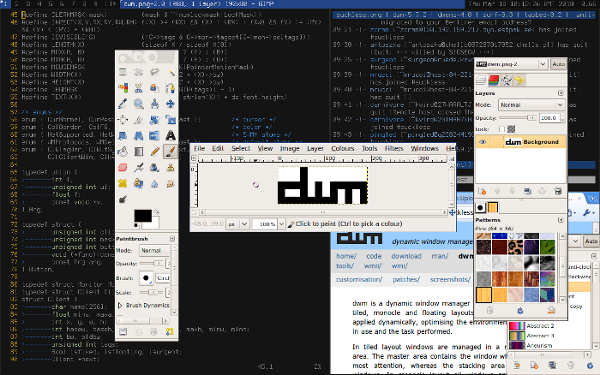
dwm is a dynamic window manager for X. It manages windows in tiled, monocle and floating layouts. All of the layouts can be applied dynamically, optimising the environment for the application in use and the task performed.
In tiled layout windows are managed in a master and stacking area. The master area contains the window which currently needs most attention, whereas the stacking area contains all other windows. In monocle layout all windows are maximised to the screen size. In floating layout windows can be resized and moved freely. Dialog windows are always managed floating, regardless of the layout applied.
Windows are grouped by tags. Each window can be tagged with one or multiple tags. Selecting certain tags displays all windows with these tags.
Each screen contains a small status bar which displays all available tags, the layout, the number of visible windows, the title of the focused window, and the text read from the root window name property, if the screen is focused. A floating window is indicated with an empty square and a maximised floating window is indicated with a filled square before the windows title. The selected tags are indicated with a different color. The tags of the focused window are indicated with a filled square in the top left corner. The tags which are applied to one or more windows are indicated with an empty square in the top left corner.
#!/bin/bash
# @see https://uriesk.wordpress.com/2015/02/13/backup-your-caldav-calendar-with-cadaver/

CALDAV_URL=$1
CALDAV_USER=$2
CALDAV_PASSWD=$3

/bin/cat < ~/.netrc
default
login ${CALDAV_USER}
password ${CALDAV_PASSWD}
EOM

set -e

mkdir -p /tmp/calendar
cd /tmp/calendar

cadaver "$CALDAV_URL" << EOA
mget *.ics
EOA

# check if any files were downloaded
compgen -G "*.ics" > /dev/null || exit 1

FILENAME=/tmp/backups/calendar-${CALDAV_USER}-`date +%Y.%m.%d`.tar.bz2

cd ..
tar cvfj "$FILENAME" calendar
rm -r /tmp/calendar
rm ~/.netrc

echo "Backup file $FILENAME successfully completed on `date`."
Introduction to pvcreate command
pvcreate command initializes a disk or partition as a physical volume. The physical volumes are used to create a volume group and the LVM logical volumes are created on the volume groups.
Test read/write speed of SD/microSD/USB/SSD/HDD.
Bash script for Mac OS X and Linux to test SD/microSD card or SSD/HDD/USB drive read and write speed.
Usage:
$ bash sd_card_speed_test.sh <path to directory which should be tested>IE: /Volumes/Untitled and not /dev/disk2
Note: administrator password is necessary for sudo to reset file system cache. Read speed result is incorrect without cache reset.
gvfs-mtp
With lsusb you can get information about your device where Bus and Device numbers can be used with gvfs-mtp and device ID for creating of an udev rule.
Bus 002 Device 018: ID 04b7:88a9 Compal Electronics, Inc.To see detected device with enabled MTP
Use gio mount:
gio mount -li | grep -e ^Volume -e activation_root

Volume(0): MT65xx Android Phone
  activation_root=mtp://[usb:002,018]/
Use lsusb:
lsusb -v 2> /dev/null | grep -e Bus -e iInterface -e bInterfaceProtocol

...
Bus 002 Device 018: ID 04b7:88a9 Compal Electronics, Inc.
      bInterfaceProtocol      0
      iInterface              5 MTP
...
To mount all available connected MTP devices use inline script
gio mount -li | awk -F= '{if(index($2,"mtp") == 1)system("gio mount "$2)}'To mount or dismount from a command with gvfs-mtp use Bus and Device numbers, e.g. to mount gio mount mtp://[usb:001,007]/ and to unmount gio mount -u mtp://[usb:001,007]/. The mounted device will be available in a directory that begins with mtp:host= and is located under /run/user/$UID/gvfs/.
Quand on a un périphérique MTP sous Linux (typiquement mon téléphone sous Android) quand je le connecte, j'accède correctement à mes documents via le gestionnaire de fichiers (Nautilus, je suis sous GNOME).
Pour vérifier que notre périphérique est détecté, on peut utiliser :
mtpfs --list-devicesPour monter, le périphérique (Il ne doit pas être monté), on utilisera la commande mtpfs suivi du point de montage :
mtpfs ~/mntUsers can share PKGBUILDs using the Arch User Repository. It does not contain any binary packages but allows users to upload PKGBUILDs that can be downloaded by others. These PKGBUILDs are completely unofficial and have not been thoroughly vetted, so they should be used at your own risk.
We are all familiar with burning live usb stick to boot our Manjaro isos. That is useful when you are installing manjaro on a new machine. However, if you already have linux installed with grub, there is a better way to boot Manjaro iso files. I usually do this when I test new iso files for a new release or when I need to use a rescue system because one of my experiments rendered my installation unbootable.

Logical volume management which named lvm allows you to decrease or increase the size of the logical volume and also filesystem. I 'll try to explain how to decrease logical volume size and also Filesystem size on this KB.

Le but de cet article est de fournir aux lecteurs une solution clé en main pour tester certains points de sécurité d'un matériel utilisant le protocole ZigBee. Dans un premier temps, nous présenterons le protocole ainsi que certaines de ses spécificités. Par la suite, quelques attaques possibles sont décrites et pour finir, un cas pratique est présenté.
F3 - Fight Flash Fraud. Contribute to AltraMayor/f3 development by creating an account on GitHub.