103 liens privés
Karate is the only open-source tool to combine API test-automation, mocks, performance-testing and even UI automation into a single, unified framework. The syntax is language-neutral, and easy for even non-programmers. Assertions and HTML reports are built-in, and you can run tests in parallel for speed.
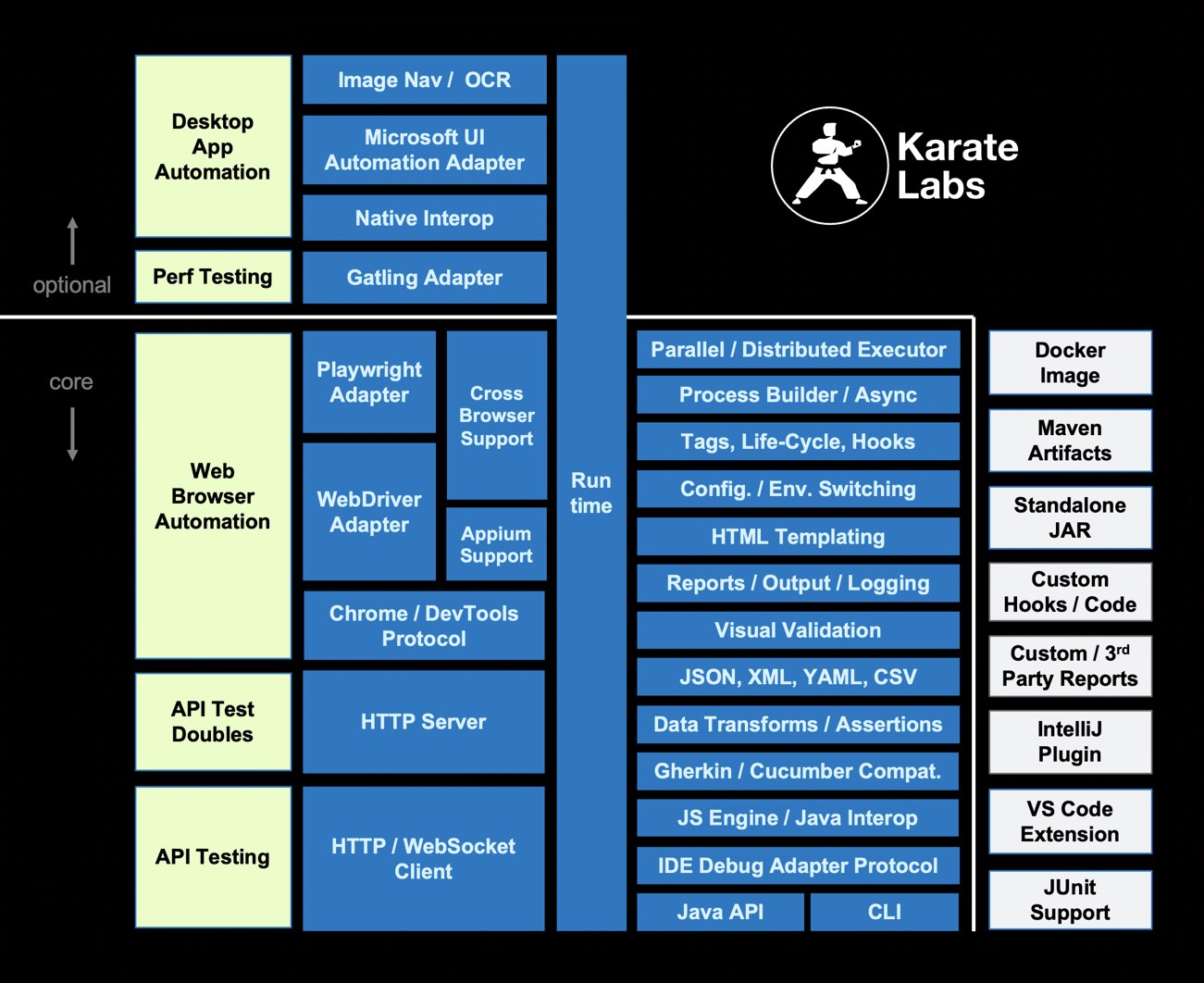
There’s also a cross-platform stand-alone executable for teams not comfortable with Java. You don’t have to compile code. Just write tests in a simple, readable syntax - carefully designed for HTTP, JSON, GraphQL and XML. And you can mix API and UI test-automation within the same test script.
A Java API also exists for those who prefer to programmatically integrate Karate’s rich automation and data-assertion capabilities.


Easy to use, stylish placeholders
Just add your desired image size (width & height) after our URL, and you'll get a random image.
https://picsum.photos/200/300To get a square image, just add the size.
https://picsum.photos/200The GeoReport API v2 allows developers to build applications to both view and report issues which government entities like cities are responsible for addressing. These interactions are often referred to as “service requests” or “calls for service” and have traditionally been handled by custom web forms or phone based call centers (sometimes using the 311 phone number or other short-code). The GeoReport API is designed to allow both government and third party developers to create new applications and technologies that can integrate directly with these same official contact centers in any government that supports the standard. The current specification is focused on location-based non-emergency issues such as graffiti, potholes, and street cleaning.
The API consists of two main kinds of resources: services and service requests, but some servers that can’t generate a realtime service request may also rely on a token resource. In total there are six methods used to interact with these resources: GET services, GET a service definition (a specific service_code id), POST a request, GET requests, GET a request (a specific service_request_id). The documentation below (starting from the API Methods section) is ordered based on a common sequence of interactions where a person first sees a list of available service types, selects one and creates a new service request, and then is able to track the status of that request and other requests. However each method can be accessed independently and some applications may only be focused on querying existing service requests to do analytics.
Description
L' API Adresse permet d'interroger facilement la Base Adresse Nationale.
A quoi sert l'API Adresse ?
En intégrant l'API dans votre système d'information, vous pouvez facilement rechercher une adresse et :
- faire de l'autocomplétion et de la vérification d'adresse
- géolocaliser une adresse sur une carte
- faire une recherche géographique inversée (trouver la rue la plus proche de coordonnées géographiques)
L’accès aux signaux EcoWatt des régions via une API est ouvert à tous, que vous soyez une collectivité, une entreprise ou un citoyen.
Pour cela, RTE met à votre disposition une API publique disponible sur son Portail data
Vous y trouverez le guide utilisateur vous permettant d'exploiter les signaux EcoWatt à partir de cette API. Par exemple, une entreprise peut programmer automatiquement la baisse de la température de ses locaux lorsqu'un signal EcoWatt orange ou rouge est émis.
Enfin, vous pouvez également relayer les signaux du site monecowatt.fr directement sur votre site internet grâce à notre widget.

REST API
Home Assistant provides a RESTful API on the same port as the web frontend. (default port is port 8123).
If you are not using the frontend in your setup then you need to add the api component to your configuration.yaml file.
http://IP_ADDRESS:8123/ is an interface to control Home Assistant.
http://IP_ADDRESS:8123/api/ is a RESTful API.
The API accepts and returns only JSON encoded objects.
All API calls have to be accompanied by the header Authorization: Bearer ABCDEFGH, where ABCDEFGH is replaced by your token. You can obtain a token ("Long-Lived Access Token") by logging into the frontend using a web browser, and going to your profile http://IP_ADDRESS:8123/profile.

Postman helps you be more efficient while working with APIs. Using Postman, you can construct complex HTTP requests quickly, organize them in collections and share them with your co-workers.