103 liens privés

Bloquez les appels indésirables avec Saracroche
Saracroche est une application iOS et Android qui bloque les appels indésirables. Simple, efficace, et respectueuse de votre vie privée.
Pourquoi choisir Saracroche ?
Open Source
Code source disponible sous licence GNU GPLv3. Transparent et auditable par tous.
Blocage efficace
Bloque et identifie environ 16 millions de numéros indésirables selon les données de l'ARCEP et les signalements.
Hors ligne
Fonctionne sans connexion Internet. Les listes sont sur votre appareil.
Signalement
Signalez les numéros indésirables depuis l'application pour améliorer le blocage.
Confidentialité
Aucune donnée personnelle n'est collectée. Votre vie privée est protégée.
Légèreté
Application compacte qui n'alourdit pas votre téléphone.

/e/OS Foundation & Community
New to /e/OS ? Check out the Getting Started section. Official announcements from /e/OS non-profit Foundation, articles & videos from the medias, and community sharing to a project in public interest.
Community
Start a community of /e/OS users in your area. Read all about the events and activities planned in the days ahead in this section. Showcase your creative side. Post photos or wallpapers you created in the Gallery. We will try to add the popular or most liked ones to the ROM.
Using /e/OS
Need help using /e/OS ? Confused with app or system settings ? Read simple [HOWTO]’s or get links to posts on the forum with solutions and workarounds to your problems. Post your queries and suggestions in the User Queries section
/e/OS Smartphone Operating System
Learn about the latest & greatest /e/OS delivery, supported devices, features and available languages. Share your feedback so that we can keep making /e/OS the best for you!
eOSWiki
This section will have a list of [HOWTO]'s available on the site. Share Installation Document suggestions Help us build /e/OS better. Collaborate in the documentation
/e/OS Devices
Here you will find the device supported by /e/ arranged by their vendor names. Please raise issues related to device in their specific sections. To add a new device to the /e/OS supported list please create a topic in the ‘Request a Device’ section. Checkout the list of Unofficial Device ROM’s
/e/OS en Français
Enjoy /e/ forum in French (join Français group to contribute). Profiter du forum en Français (rejoindre le groupe Français afin de pouvoir contribuer).
Un réseau social fédéré axé mobile propulsé par ActivityPub. Rejoignez le fediverse avec confidentialité, sécurité et liberté.
Connectez-vous au fediverse via un serveur relais conçu spécifiquement pour les appareils mobiles. Rejoignez un réseau décentralisé où vous contrôlez vos données, votre vie privée et votre expérience sociale.
FMD Android
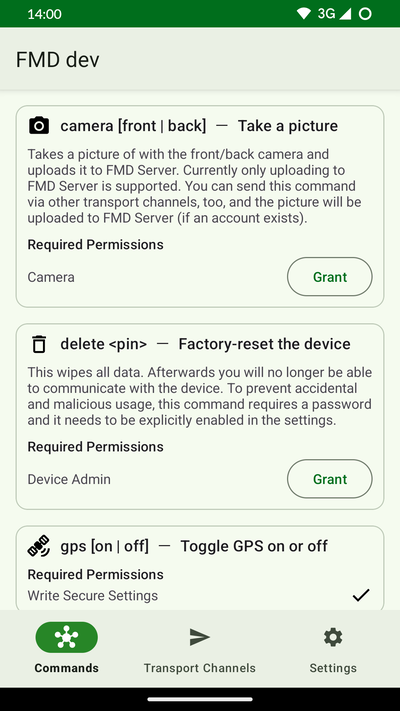
An app to locate and remotely control your Android device. This is useful if you have lost or misplaced it.
FMD Server
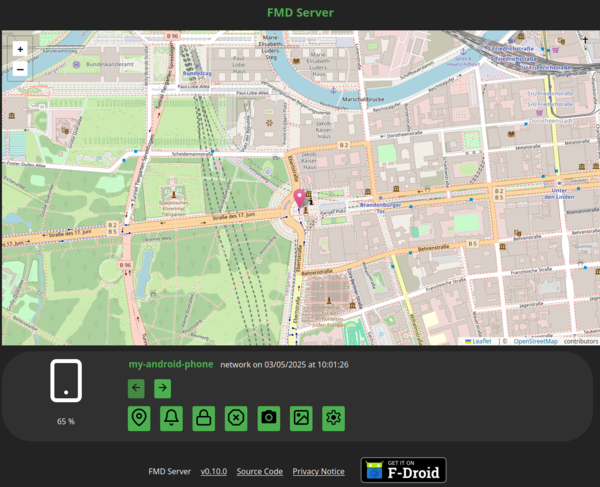
A web server to connect to FMD Android, and a web interface to control your device.
Congratulations UnifiedPush! Congratulations Murena!
Murena's /e/OS 2.5 ships with UnifiedPush support included as announced by a small note in the 2.5-t release notes .
This exciting development brings Google-free push messaging to the regular users of an important player in the freedom mobile OS space.
ntfy lets you send push notifications to your phone or desktop via scripts from any computer, using simple HTTP PUT or POST requests. I use it to notify myself when scripts fail, or long-running commands complete.
About us
A group of simple, open source apps without ads and unnecessary permissions, with customizable colors. A fork of @SimpleMobileTools.
What we stand for
Our vision
Imagine a world where mobile apps enhance our lives without invading our privacy. That's what Fossify strives for. We envision a thriving community of people working together to create free, open-source apps that benefit everyone. Join us and build a more secure, user-friendly digital future, one app at a time.
Our mission
Building privacy-first mobile apps for everyone. Fossify revives the legacy of @SimpleMobileTools, crafting open-source tools that are ad-free and easy to use. We empower individuals and communities with technology that respects their privacy and keeps things simple.
Our products
Fossify apps are a community-backed, open-source, and ad-free suite of mobile apps. A fork of the @SimpleMobileTools, which is no longer maintained, and we're here to continue the legacy, bringing simple and private tech to everyone.
- Calendar
- contacts
- File Manager
- Gallery
- Messages
The Linux distribution for mobile devices and beyond…
Mission
postmarketOS develops free and open-source software to extend the life of consumer electronics. By empowering people to have full control of their devices, we promote a healthier and more sustainable society.
Sustainability
Oftentimes the usefulness of phones, tablets and other computers is artificially limited by lack of software updates. This is either caused by closed source software that cannot be updated by anyone but the original developers. Or by having highly specific code for few devices, which can only be maintained and updated by a large team of developers. With postmarketOS we do the opposite, we build an open source operating system with many shared components that can run on all devices. We want to keep our hardware useful until it physically breaks!
Full Control
We think computers should act in the interest of their users. For example, they should not participate in the privacy nightmare of targeted advertising, as it is directly built into the operating systems from Amazon, Apple, Google and Microsoft, as well as the apps and services recommended by them. postmarketOS respects your privacy, and gives you full control over your device. It turns your device into a tool for you to use, not the other way around. Our source code proves it.
LineageOS Android Distribution
A free and open-source operating system for various devices, based on the Android mobile platform.
Individuality
Customization is paramount to productivity.
That’s why LineageOS promises to push for user personalization and preference.
Everyone is unique and your device should be too.
Security
Your data, your rules. Along with monthly security updates to every supported device, we enhance existing privacy touchpoints around the OS and keep you informed of how the system shares your data.
Longevity
LineageOS extends the functionality and lifespan of mobile devices from more than 20 different manufacturers thanks to our open-source community of contributors from all around the world.
Power to you
Our open-source apps are here to help you get through the day.
Want to do more with your device?
Power users will enjoy Unix command-line utilities.
Android developers will turn any device into the perfect device for apps development thanks to enhanced tools and debugging capabilities.

GrapheneOS
The private and secure mobile operating system with Android app compatibility. Developed as a non-profit open source project.

About
GrapheneOS is a privacy and security focused mobile OS with Android app compatibility developed as a non-profit open source project. It's focused on the research and development of privacy and security technology including substantial improvements to sandboxing, exploit mitigations and the permission model. It was founded in 2014 and was formerly known as CopperheadOS.
GrapheneOS improves the privacy and security of the OS from the bottom up. It deploys technologies to mitigate whole classes of vulnerabilities and make exploiting the most common sources of vulnerabilities substantially more difficult. It improves the security of both the OS and the apps running on it. The app sandbox and other security boundaries are fortified. GrapheneOS tries to avoid impacting the user experience with the privacy and security features. Ideally, the features can be designed so that they're always enabled with no impact on the user experience and no additional complexity like configuration options. It's not always feasible, and GrapheneOS does add various toggles for features like the Network permission, Sensors permission, restrictions when the device is locked (USB-C / pogo pins, camera, quick tiles), etc. along with more complex user-facing privacy and security features with their own UX.
The features page provides an overview of the substantial privacy and security improvements added by GrapheneOS to the Android Open Source Project (AOSP). Many of our past features were contributed to AOSP, Linux and other projects to improve privacy and security for billions of users so they're no longer listed on our features page.
Official releases are available on the releases page and installation instructions are on the install page.
GrapheneOS also develops various apps and services with a focus on privacy and security. Vanadium is a hardened variant of the Chromium browser and WebView specifically built for GrapheneOS. GrapheneOS also includes our minimal security-focused PDF Viewer, our hardware-based Auditor app / attestation service providing local and remote verification of devices, our modern privacy / security focused camera app, and the externally developed Seedvault encrypted backup which was initially developed for inclusion in GrapheneOS.
No Google apps or services
GrapheneOS will never include either Google Play services or another implementation of Google services like microG. It's possible to install Play services as a set of fully sandboxed apps without special privileges via our sandboxed Google Play compatibility layer. See the FAQ section for more details on our plans for filling in the gaps from not shipping Play services and Google apps.
Welcome to Android Flash Tool
You can use this tool to install Android builds on your devices.
This tool allows you to flash Android (official google release) onto recent Pixel devices and some Android development devices. This tool doesn't support flashing Android onto Chrome OS devices.
Vos données sont VOS données !
Nous construisons des systèmes d'exploitation pour smartphones désirables, open source, respectueux de la vie privée.
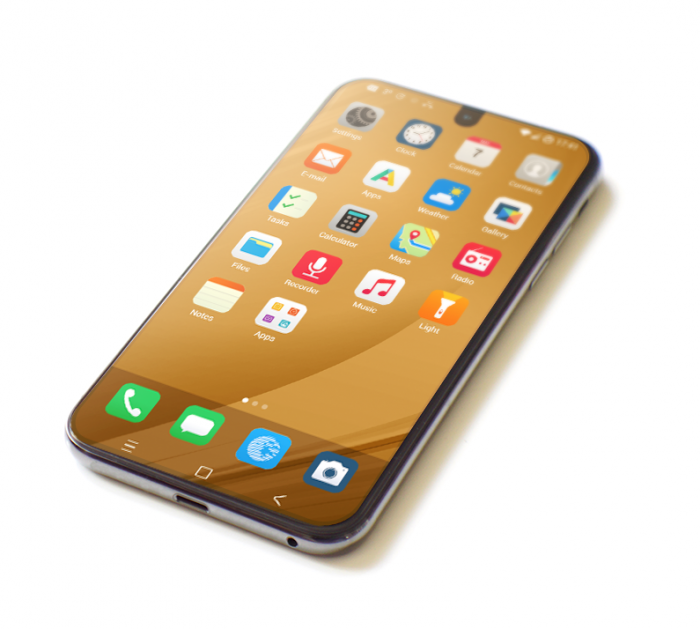
Votre smartphone recueille vos données toute la journée, capturant avec beaucoup de détails où vous êtes, qui vous êtes et ce que vous faites 24h/24 et 7j/7.
Il est temps de fuir la surveillance mobile !
Profitez d'une conception axée sur le respect de la vie privée
Nous ne scrutons pas vos données sur votre téléphone ou dans le Cloud, nous n'enregistrons pas ou ne suivons pas votre position GPS, nous ne relevons pas ce que vous faites avec vos applications. Nous ne le ferons jamais.
Compatible avec toutes les applications
Comme notre système d'exploitation fonctionne sur un Android entièrement dégooglisé, vous pouvez exécuter la plupart de vos applications préférées, accéder facilement à vos comptes bancaires, discuter avec vos amis et jouer à votre jeu préféré.
Évaluez le niveau de vie privée de vos applications
Savez-vous vraiment si une application est sûre pour vos données personnelles ? Nous le savons ! Chaque application de notre magasin est scannée et analysée, de sorte qu'en un clin d'œil, vous puissiez voir quelles sont les applications sûres et celles qu'il vaut mieux éviter.
Échapper à la surveillance numérique
Non seulement /e/OS vous informe sur les trackers présents dans les applications, mais vous pourrez également choisir d'accepter ou non de rester tracké dans le widget Advanced Privacy, avec d'autres fonctionnalités intéressantes telles que la possibilité de masquer votre adresse IP ou votre géolocalisation lorsque vous le souhaitez.
Cette fonctionnalité et notre bloqueur de publicité activés par défaut dans le navigateur Web vous permettront également de profiter d'une vie numérique avec très peu ou aucune publicité dans les applications et sur le Web.

Running on old Android versions
F-Droid repos generally maintain support for old F-Droid releases for a long time. That means that old F-Droid releases will continue to work for years. That provides a path to run F-Droid on very old Android releases.
Une application simple de blocage d'appels qui vous aidera à éviter de répondre aux appels indésirables en utilisant une base de données de numéros de téléphone participative.
gvfs-mtp
With lsusb you can get information about your device where Bus and Device numbers can be used with gvfs-mtp and device ID for creating of an udev rule.
Bus 002 Device 018: ID 04b7:88a9 Compal Electronics, Inc.To see detected device with enabled MTP
Use gio mount:
gio mount -li | grep -e ^Volume -e activation_root

Volume(0): MT65xx Android Phone
  activation_root=mtp://[usb:002,018]/
Use lsusb:
lsusb -v 2> /dev/null | grep -e Bus -e iInterface -e bInterfaceProtocol

...
Bus 002 Device 018: ID 04b7:88a9 Compal Electronics, Inc.
      bInterfaceProtocol      0
      iInterface              5 MTP
...
To mount all available connected MTP devices use inline script
gio mount -li | awk -F= '{if(index($2,"mtp") == 1)system("gio mount "$2)}'To mount or dismount from a command with gvfs-mtp use Bus and Device numbers, e.g. to mount gio mount mtp://[usb:001,007]/ and to unmount gio mount -u mtp://[usb:001,007]/. The mounted device will be available in a directory that begins with mtp:host= and is located under /run/user/$UID/gvfs/.
Quand on a un périphérique MTP sous Linux (typiquement mon téléphone sous Android) quand je le connecte, j'accède correctement à mes documents via le gestionnaire de fichiers (Nautilus, je suis sous GNOME).
Pour vérifier que notre périphérique est détecté, on peut utiliser :
mtpfs --list-devicesPour monter, le périphérique (Il ne doit pas être monté), on utilisera la commande mtpfs suivi du point de montage :
mtpfs ~/mntYour Phone Should Be Private
Everyone needs a phone. Not everyone wants to be spied on.
Reclaim your privacy with CalyxOS.
CalyxOS is an Android mobile operating system that puts privacy and security into the hands of everyday users. Plus, proactive security recommendations and automatic updates take the guesswork out of keeping your personal data personal.
Faire une sauvegarde
$ adb devices
* daemon not running. starting it now on port 5037 *
* daemon started successfully *
List of devices attached
TA98601E4J  device

$ adb backup -apk -shared -all -f backup.ab
Restaurer une sauvegarde
adb restore backup.ab
Android Boot Manager is a new dualboot tool for Android. There were many of them before, such as: EFIDroid, MultiROM, Dualboot Patcher, etc. Usually they reflashed boot dynamically for dualbooting. Some of them used one big hack like MultiROM's kexec-hardboot.